Lexideck: mobile SRS vocabulary practice with AI and OCR
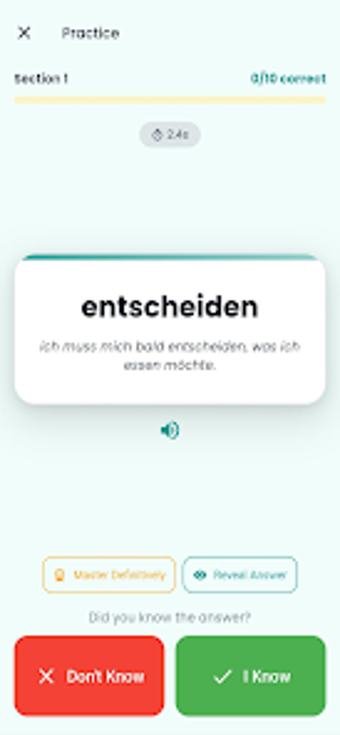
Lexideck, from ErokoTech s.r.o., is an Android vocabulary trainer built to help learners retain foreign-language words through scheduled review and contextual examples. The app combines a spaced-repetition scheduling engine with camera-based text capture, integrated audio pronunciation, and AI-generated example sentences for usage. CEFR-aligned levels, custom dictionaries, and cross-device synchronization support students, travelers, and self-directed learners who need organized, long-term vocabulary study on mobile devices.
What Lexideck is built to do for vocabulary study
Lexideck positions itself as a focused vocabulary trainer that schedules reviews around items learners find difficult, using a Smart Repetition System to surface weak items more often. The app supports multiple from-to language combinations and over 30 languages, so learners preparing for exams or short-term travel can centralize new words in one place and keep a study rhythm aimed at long-term retention.
How the app applies learning methods and context
The tool combines algorithmic review with contextual practice by pairing scheduled reviews with AI-generated example sentences and integrated Text-to-Speech for pronunciation practice. Users can import text by pointing the camera at printed material via OCR, then study those extracted words with contextual sentences, a workflow that ties spaced review to real-world usage and audible models of the target language.
Who benefits and what accessibility looks like
Lexideck suits self-directed learners and exam candidates because it maps content to CEFR levels from A1 through C2 and lets users build custom dictionaries by topic. Cross-device synchronization keeps study progress available on Android and iOS devices, while saved words remain accessible offline; features that depend on automatic translation or AI sentence training require an internet connection, which affects offline-only workflows.
How progress and customization support study plans
Progress tracking is explicit and measurable: the app provides daily statistics and learning streaks so learners can set study targets and monitor consistency. Custom dictionaries let students group vocabulary by theme, and synchronization preserves progress across devices. For classroom-adjacent use the app supports organized decks and exportable lists, enabling teachers or tutors to review a learner's saved items when both parties use the same decks.
Good fit for disciplined mobile learners, with online-dependent caveats
Lexideck is a practical option for students and independent learners who want scheduled practice and contextualized examples, because its design centers on measurable review and real-world sentence examples. Learners who require full offline capability should note that translation and AI-powered sentence training need an internet connection. For those who study across devices and accept online-dependent features, Lexideck supports steady vocabulary growth with clear progress metrics.